



Code clarity you can see
High-fidelity visual explanations that reduce misinterpretation and make complex requirements easier to apply












See and apply code requirements with confidence
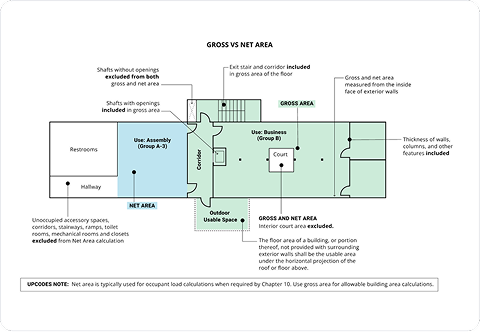
Code interpretation shouldn’t rely on guesswork. The Diagrams Library turns complex requirements into clear, visual references-grounded in adopted codes and tailored to jurisdiction, code year, and context. Diagrams surface exactly where teams work, helping everyone interpret, align, and move forward with confidence.

Bring the code to life
- 2,500+ diagrams
- Jurisdiction-specific variations
- Linked directly to governing code sections

Understand tricky code in context
Each diagram links back to to its governing code section and related assemblies-so interpretation stays grounded in the requirement itself.

Filter diagrams to match your project
Whether you’re planning, reviewing, or enforcing, diagrams slot into work you’re already doing.

Behind each diagram is a structured process designed to keep visuals aligned with the code.


We prioritize diagrams for tricky or frequently asked-about sections, plus direct user requests where text alone isn’t cutting it.
Code consultants and subject matter experts help interpret jurisdiction-specific nuances before anything is drawn.
Diagrams go through QA/QC to verify dimensions, labels, and intent, and to avoid misreadings (like mixing up “shall” and “shall not”).
Once published, diagrams are linked to their code sections and related resources. User feedback, jurisdiction updates, and new interpretations drive revisions and, when needed, new jurisdiction-specific versions.
